
 Beyond the Jira Velocity Report: Enhancing Multi-Sprint Reporting
Root Cause Analysis and RCA Report in Jira
Leverage custom fields to initiate data collection for root cause analysis in Jira, enabling the creation of comprehensive RCA reports.
Introduction
In this blog article, we will explore the significance of Root Cause Analysis (RCA) in managing bugs, defects, and incidents within Jira. We’ll delve into how integrating RCA practices can enhance your retrospectives, post-mortem discussions, and evaluations of team or individual performance. Moreover, we’ll briefly guide you through the process of customizing your Jira instance to incorporate a dedicated custom field tailored for capturing and analyzing root cause data. Leveraging the capabilities of our robust app – Performance Charts for Jira – you’ll gain the ability to generate insightful RCA reports directly within Jira, unlocking the full potential of this valuable data.
Uncover Bug Origins: Root Cause Analysis in Jira
Root Cause Analysis (RCA) is a systematic approach widely employed across industries to unveil the fundamental reasons behind problems or incidents, playing a pivotal role in software development. Its effectiveness in delving deep into issues is well-recognized, as it enables teams to prevent recurrence and drive continuous improvement. Unfortunately, despite its significance, Jira Software and Jira Service Management currently lack a built-in tool or a system field dedicated to tracking root causes.
However, if you choose to adopt RCA, it brings numerous benefits, including driving continuous improvement, preventing the recurrence of bugs, promoting accountability, and improving overall quality. From a performance-review standpoint, this analysis of Jira data can greatly assist managers in enhancing team meetings, reviews, and feedback sessions. Here’s how:
- Objective Evaluation: Root Cause Analysis (RCA) provides factual data on performance issues. This ensures unbiased assessments during reviews, relying on concrete evidence and clear data rather than broad generalizations, such as the sheer number of bugs.
- Setting Realistic Goals: By uncovering the root causes of past performance issues, RCA empowers managers to establish attainable goals that address underlying problems and align with the organization’s objectives. This ensures that performance expectations are based on insights derived from data analysis, rather than arbitrary or unrealistic targets.
- Constructive Feedback: Leveraging RCA insights, managers can provide more nuanced feedback during performance reviews. Rather than solely identifying performance gaps, they can delve into the underlying reasons behind these gaps and propose tailored strategies for improvement.
Mastering Data Collection for RCA Reports in Jira
Data collection is the foundation of the problem-solving process. To kickstart the data collection process in Jira for your RCA efforts, begin by creating a custom field named “Root Cause” within Jira. Then, list the identified cause options within this field. Configure it to display on the “Resolution” screen, typically appearing during the transition of the “Bug” issue type to Closed/Done/Resolved. Establishing a shared understanding and consensus on the definitions of the root cause options is essential for the team. This ensures that each user feels confident when making root cause selections in Jira. Here are a few common and widely applicable root causes of issues that often arise within the team. Feel free to define your own as well:
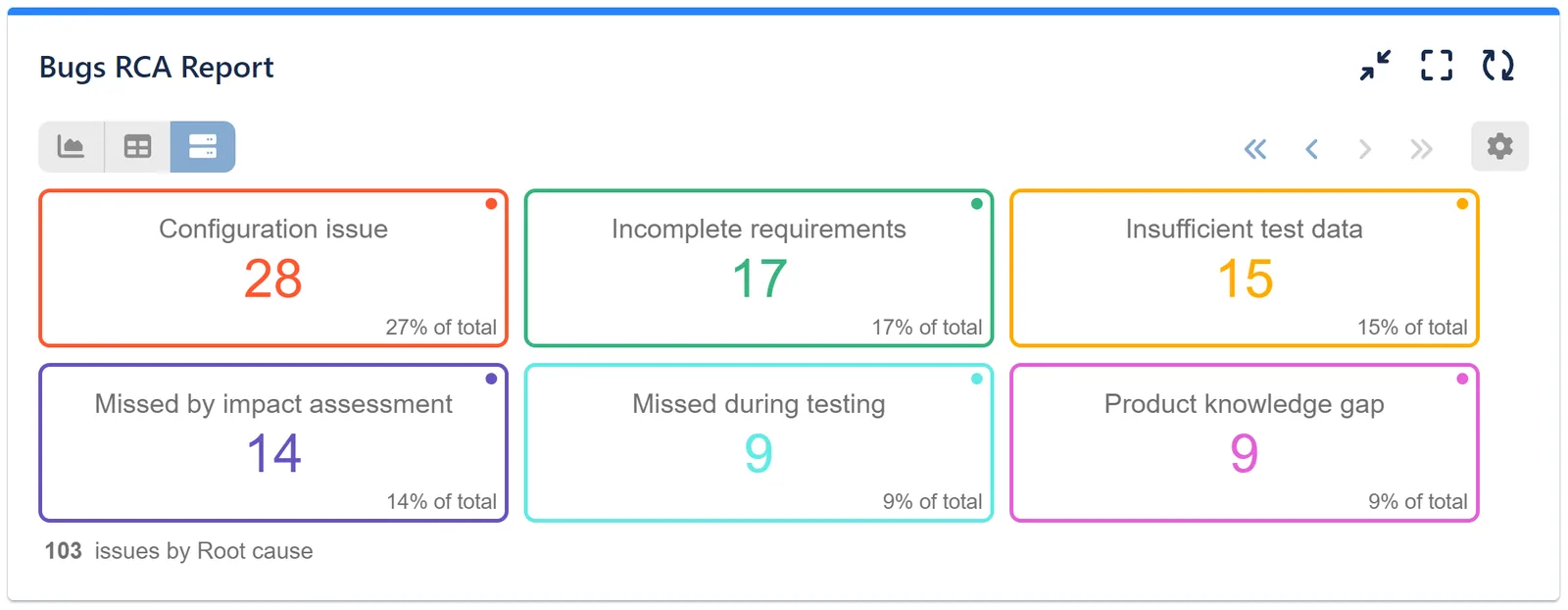
- Missed during testing – The defect was overlooked during testing activities, including Development, QA, and Code Review phases.
- Missed by impact assessment – The defect resulted from an incomplete impact assessment that failed to identify other affected components of a change. This is a common cause of regression issues.
- Incomplete requirements – Vague requirements led to misinterpretation by the team involved in developing and validating them.
- Configuration issue – Deployment or build problems caused by configuration mistakes, such as incorrect environment variable setup or version control tag errors.
- Insufficient test data – Lack of comprehensive test data leads to the failure to validate edge cases. Test and local development environments may lack rich data, hindering the Development and/or QA team’s ability to fully simulate and test certain features.
- Product knowledge gap – Inconsistencies in product implementation often stem from a lack of understanding across components or features. This indicates a need for increased cross-component/feature awareness within the team.
- 3rd party issue – Issues arising from components beyond the team’s control, such as external code libraries, changes to partner APIs, non-backward compatible upgrades of frameworks, browsers, or operating systems.
Watch the demo video showcasing the selection of a root cause during the transition of a bug to the “Done” column in Jira. For a step-by-step guide on configuring RCA on your instance, please refer to thisarticle.
Here’s an example of a demo RCA report in Jira created using the Performance Charts gadget in Tiles View:
Explore the powerful features of the Performance Charts app or browse the Jira KPI example reports.
- Beyond the Jira Velocity Report: Enhancing Multi-Sprint Reporting
 How to Track Open Issues Over Time in Jira (with Historical Trends)
 Beyond Basic Bug Tracking: 4+ Reports for Advanced Jira Defect Management
 Stop Exporting to Excel: Create Custom KPIs Directly in Your Jira Dashboard with Custom Formula
 A Guide to Building Advanced Sprint Reports for Jira Dashboard
 Jira Time in Status Reports: A Practical Guide to Improving Your Workflow
 Managing Sprint Carryover in Jira
 How to Filter and Report on Overdue Issues in Jira
Meaningful Reports for Jira, Made Easy
DevAcrobats develops reporting apps for Jira that extend its capabilities, enabling teams to streamline workflows and enhance performance.