
 Beyond the Jira Velocity Report: Enhancing Multi-Sprint Reporting
How to Recognize Story Points by Developer in Jira?
Tracking individual story points by developer is beneficial for accurate sprint commitment planning and is highly sought after within the Atlassian community.
Introduction
In Jira, there isn’t a standard feature specifically designed to recognize story points by developers individually, out-of-the-box. Story points are typically assigned to user stories or tasks as a measure of their relative complexity or effort required to complete them, rather than to gauge individual developer productivity. However, tracking story points by developer is highly sought after within the Atlassian community, as it has the potential to provide valuable insights. This article aims to demonstrate how to access this data and explores scenarios where it could prove beneficial for your business.
How to Track the Delivery of Story Points by Developers in Jira?
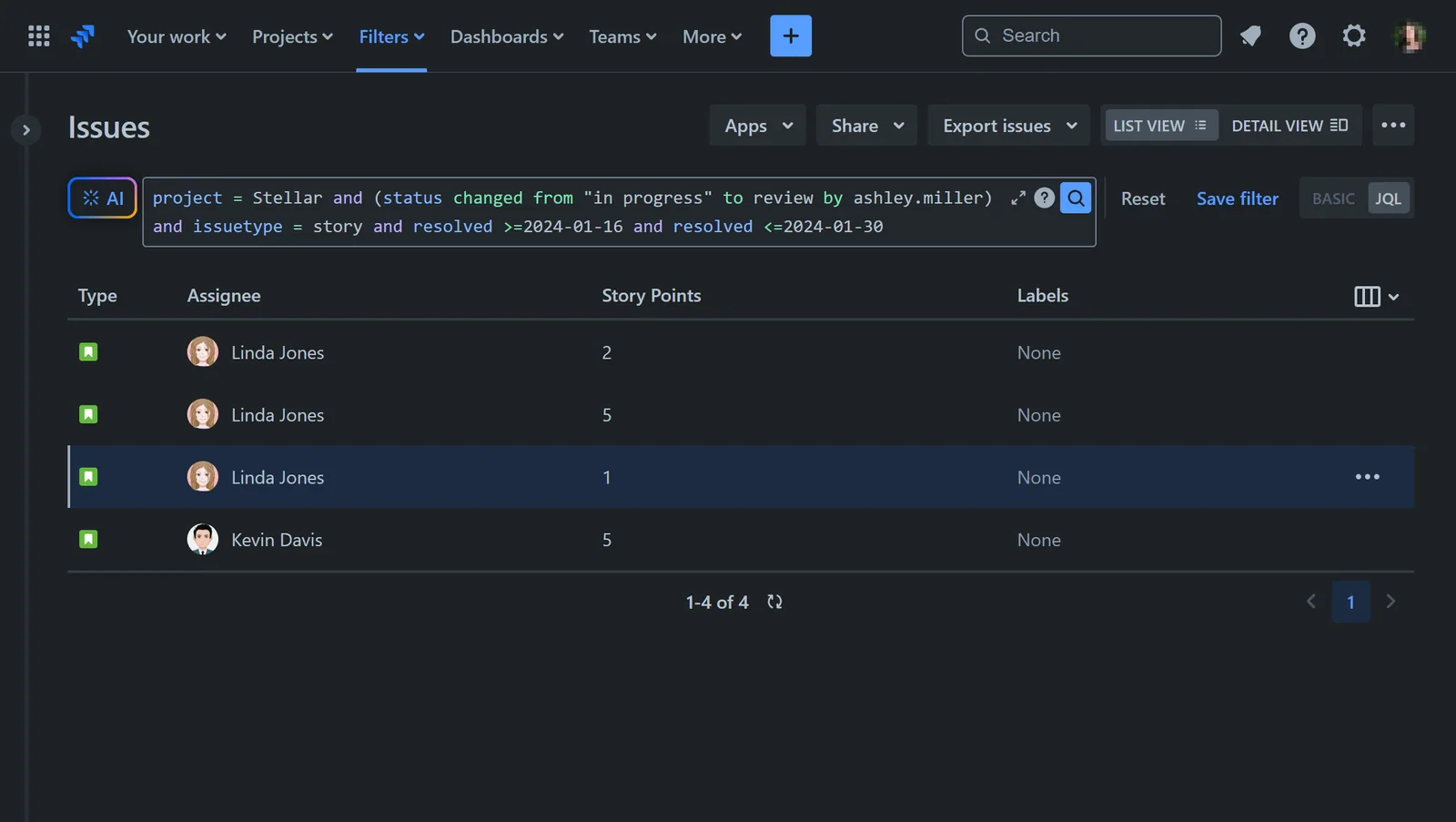
If it’s typical for a single developer to handle an issue across all statuses of your workflow, tracking the delivered story points by that developer for a specific sprint or timeframe is straightforward. However, this scenario is rare. Typically, an assignee changes as an issue progresses from “In Progress” to “Review,” “Testing,” or other statuses. Consequently, determining how many story points were delivered by the developer who worked on it while “In Progress” isn’t straightforward. You may need to use JQL queries in Jira Issue Navigator to see this data:
- the user that transitioned issue from status “In Progress” to “Review”, ‘Testing’, ‘Done’
- the user that transitioned issue from status “Open” to ‘Review, ‘Testing’, ‘Done”
and JQL queries like:
(status CHANGED FROM “In Progress” TO “Review” BY linda.jones) or
(status CHANGED FROM “In Progress” TO “Testing” BY linda.jones) or
(status CHANGED FROM “In Progress” TO “Done” BY linda.jones)
In our sample JQL query, we’ve filtered all issues where Ashley Miller served as the Assignee while the issue was in progress. We’re utilizing her Profile ID because using her name in JQL equates to the current Assignee only.
Another approach involves creating a custom field (e.g., “Developed by”) and using Jira Automation, then reporting by this field with the help of the Performance Charts app. For detailed guidance on implementing this approach, refer to our article: A 3-Step Guide to Enrich Your Jira Reports with Jira Custom Fields and Automation.
Track Individual Developer Story Points for Accurate Sprint Commitment Planning
Tracking individual developer story points may be beneficial for accurate sprint commitment planning. By monitoring the story points delivered by each developer, teams gain valuable insights into their productivity (individual velocity) and contribution to sprint progress. This information enables more informed decisions when allowing high-performing developers to take on additional responsibilities or mentor others. Moreover, by understanding each developer’s contribution, teams can better anticipate the impact of absences, such as vacations or unexpected leave, on project timelines. This proactive approach ensures that sprint commitments are made with greater accuracy, helping teams meet their goals efficiently and effectively.
Additional Benefits of Tracking Story Points by Developer
Measuring story points delivered by each Scrum team member can provide valuable insights and benefits, as long as it is implemented thoughtfully and in alignment with the principles of agile and Scrum. It’s essential to emphasize that individual metrics should complement, not overshadow, the team’s collective accountability and collaborative spirit. Here are some benefits of tracking story points delivered by each developer:
- Aligning with Agile Principles: While Scrum emphasizes the importance of collective accountability and team performance, it also values individuals and their contributions to the team. Measuring story points delivered by each team member can help recognize individual efforts and contributions to the team’s success, aligning with the agile principle of valuing individuals and interactions.
- Identifying Strengths and Weaknesses: By tracking individual contributions in terms of story points delivered, it becomes easier to identify each team member’s strengths and weaknesses. This information can be valuable for personal development plans, mentoring opportunities, and skill improvement initiatives. It allows team members to focus on areas where they excel and address areas where they may need additional support or training.
- Improving Estimation Accuracy: Measuring story points delivered by each team member over time can provide valuable data for improving estimation accuracy. By comparing estimated story points to actual delivery (story points committed vs completed), the team can identify trends and patterns, leading to more accurate estimations in future sprints. This benefits the entire team by increasing predictability and reducing the risk of overcommitment.
- Facilitating Continuous Improvement: Tracking individual performance metrics encourages a culture of continuous improvement within the team. It provides a basis for constructive feedback and coaching, allowing team members to learn from each other and strive for higher performance collectively. By identifying areas for improvement at the individual level, the team can make targeted efforts to enhance overall performance and productivity.
- Supporting Recognition and Reward Systems: In organizations where recognition and reward systems are tied to individual performance, measuring story points delivered by each team member can provide objective data for performance evaluations. This ensures that contributions are recognized and rewarded fairly, fostering motivation and engagement within the team.
- Maintaining Transparency and Accountability: Transparently tracking individual performance metrics promotes accountability within the team. It encourages open communication and collaboration by making it clear how each team member’s contributions contribute to the overall success of the sprint.
In our Software Development KPI Reports, you can find an Individual Velocity Jira KPI Report along with step-by-step configuration guidance.
- Beyond the Jira Velocity Report: Enhancing Multi-Sprint Reporting
 How to Track Open Issues Over Time in Jira (with Historical Trends)
 Beyond Basic Bug Tracking: 4+ Reports for Advanced Jira Defect Management
 Stop Exporting to Excel: Create Custom KPIs Directly in Your Jira Dashboard with Custom Formula
 A Guide to Building Advanced Sprint Reports for Jira Dashboard
 Jira Time in Status Reports: A Practical Guide to Improving Your Workflow
 Managing Sprint Carryover in Jira
 How to Filter and Report on Overdue Issues in Jira
Meaningful Reports for Jira, Made Easy
DevAcrobats develops reporting apps for Jira that extend its capabilities, enabling teams to streamline workflows and enhance performance.